How Catering Invoicing Software Helps Businesses Stay Organized
Running a catering business involves much more than preparing and serving great food. Behind every successful event is a series of tasks that must be completed accurately and on time—from managing customer inquiries and confirming orders to scheduling staff, coordinating deliveries, and processing payments.
As a catering business grows, these responsibilities become increasingly difficult to manage with spreadsheets, paper invoices, and disconnected tools. What once worked for a handful of weekly events can quickly become overwhelming when you're handling multiple bookings, recurring clients, and complex delivery schedules.

This is why many businesses invest in catering invoicing software alongside catering management software. Together, these solutions help streamline administrative work, improve financial visibility, and keep day-to-day operations organized.
Rather than spending hours chasing paperwork, business owners can focus on what matters most—delivering excellent service and growing their business.
Why Staying Organized Becomes More Difficult as Your Business Grows
Growth is exciting, but it also introduces new operational challenges.
A catering company that once managed a few events each week may eventually coordinate:
Corporate catering
Weddings and private events
School and office meal programs
Recurring catering contracts
Multiple delivery routes
Larger kitchen production schedules
More employees and drivers
Each booking brings new information to manage, including customer preferences, event timelines, menu selections, invoices, payments, staffing, and delivery instructions.
Without a structured system, important details can easily become scattered across emails, spreadsheets, notebooks, and messaging apps.
The result is more administrative work, more opportunities for mistakes, and less time to focus on business growth.
The Hidden Cost of Manual Administration
Many catering businesses underestimate how much manual work affects efficiency and profitability.
While creating invoices or updating spreadsheets may only take a few minutes, repeating these tasks every day quickly adds up.
Time Lost on Administrative Tasks
Business owners often spend hours each week:
Creating invoices
Updating customer records
Tracking deposits
Following up on unpaid balances
Managing event information
Reconciling payments
As order volume increases, administration can consume a significant portion of the workday.
Billing Errors
Manual invoicing increases the risk of mistakes such as:
Incorrect totals
Missing charges
Duplicate invoices
Forgotten deposits
Outdated pricing
These errors can delay payments and create unnecessary back-and-forth with customers.
Poor Visibility
When invoices, payments, and customer records are stored in different places, it's difficult to answer simple questions like:
Which invoices are still unpaid?
Which clients have paid deposits?
Which events are awaiting final payment?
Limited visibility often leads to slower decision-making and unnecessary administrative work.
How Catering Invoicing Software Improves Organization
One of the biggest benefits of catering invoicing software is that it brings financial workflows into a more organized and consistent process.
Instead of manually creating invoices for every booking, businesses can streamline billing while improving payment tracking and financial visibility.
Faster Invoice Creation
Preparing invoices manually often requires:
Gathering customer information
Reviewing event details
Calculating totals
Checking deposits
Confirming pricing
An organized invoicing workflow reduces repetitive work and helps businesses send invoices more efficiently.
Better Payment Tracking
Keeping track of multiple invoices can become difficult as the business grows.
Businesses often need visibility into:
Deposits received
Outstanding balances
Partial payments
Completed invoices
Having this information readily available helps improve cash flow management and reduces missed follow-ups.
Improved Financial Accuracy
Accurate billing builds customer trust.
Well-organized invoicing processes help reduce common mistakes while ensuring customers receive clear, professional documentation for every event.
Better Customer Experience
Clients appreciate timely invoices and transparent payment information.
Professional billing creates confidence and makes the overall booking experience smoother from start to finish.
Why Catering Management Software Matters Just as Much

While invoicing is essential, it represents only one part of a catering operation.
Growing businesses also need a way to organize customer information, events, orders, staffing, and communication.
This is where catering management software plays an important role.
Centralized Order Management
Instead of managing information across multiple tools, businesses can organize:
Customer profiles
Catering orders
Event schedules
Menu selections
Delivery instructions
Keeping everything together reduces confusion and improves communication across departments.
Better Event Coordination
Each catering event requires careful planning.
Businesses need to manage:
Guest counts
Dietary requirements
Setup instructions
Event timelines
Staffing assignments
Centralized management helps ensure everyone works from the same information.
Improved Operational Visibility
Managers need quick access to operational data.
A connected system provides visibility into:
Upcoming events
Order status
Staffing requirements
Payment progress
Daily operations
Better visibility allows managers to make informed decisions and address issues before they affect customers.
The Operational Systems Every Catering Business Needs
As businesses expand, they benefit from connected systems that support multiple areas of the operation.
Point-of-Sale (POS)
A modern Point-of-Sale system helps businesses manage:
Customer payments
Sales transactions
Revenue reporting
Customer purchase history
Connecting payments with other operational processes improves overall financial visibility.
Kitchen Information Display System (KIDS)
Kitchen communication is essential for maintaining speed and accuracy.
Paper tickets and verbal updates often create:
Missed modifications
Delayed preparation
Communication gaps
Order confusion
A Kitchen Information Display System (KIDS) displays orders digitally, helping kitchen teams stay organized during busy service periods.
Employee Scheduling, Timesheets, and Payroll
Managing employees becomes more challenging as businesses grow.
Integrated HR tools help organize:
Staff schedules
Time tracking
Payroll processing
Labor reporting
This reduces administrative work while improving workforce management.
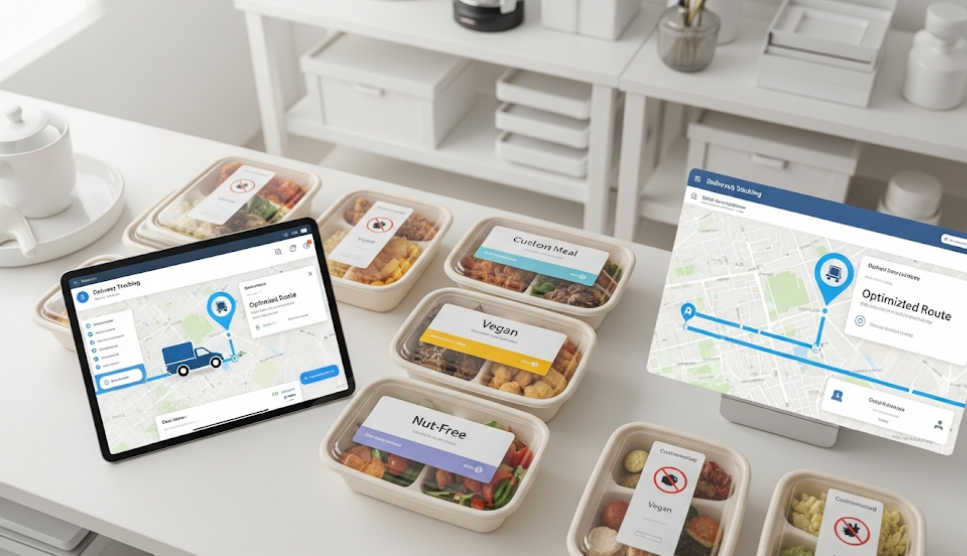
Delivery Route Optimization
Reliable delivery is just as important as great food.
Without proper planning, businesses may experience:
Late deliveries
Inefficient routes
Higher fuel costs
Driver confusion
Delivery route optimization improves planning, helping businesses deliver orders more efficiently while enhancing the customer experience.
Signs Your Current System Is No Longer Working
Many businesses continue using manual processes because they're familiar.
However, certain warning signs indicate it's time to improve operations.
You may benefit from a better system if:
Creating invoices takes too much time.
Customer information is stored in multiple places.
Staff frequently ask for order updates.
Payments are difficult to track.
Managers spend evenings handling paperwork.
Delivery schedules become increasingly difficult to coordinate.
Administrative work limits business growth.
These challenges often suggest that manual workflows are no longer supporting the needs of the business.
Choosing Software That Supports Growth
Not every solution is designed for growing catering businesses.
When evaluating software, look beyond feature lists and focus on how the platform supports daily operations.
The right solution should help you:
Reduce Administrative Work
Automation should simplify repetitive tasks and improve efficiency.
Improve Communication
Everyone—from managers and kitchen staff to delivery drivers—should have access to accurate information.
Connect Business Operations
Orders, invoices, staffing, kitchen workflows, and deliveries should work together rather than operate in separate systems.
Increase Visibility
Managers need access to real-time operational and financial information to make better decisions.
Scale With the Business
The software should continue supporting your business as bookings, customers, and employees increase.
Choosing software that grows with your business helps avoid costly operational changes later.
The Future of Catering Operations
Technology is changing how catering businesses operate.
Several trends are helping businesses become more efficient.
Digital Financial Management
Businesses are moving away from paper invoices and manual payment tracking in favor of digital workflows.
Real-Time Operational Visibility
Live dashboards allow managers to monitor bookings, staffing, and payments from a single place.
Mobile Workforce Management
Scheduling, communication, and operational updates are increasingly managed from mobile devices.
Connected Business Platforms
Rather than relying on multiple disconnected systems, more businesses are adopting integrated platforms that bring together financial management, operations, staffing, and deliveries.
This creates a more efficient workflow across the entire organization.
Conclusion
As catering businesses grow, staying organized becomes just as important as delivering exceptional food. Manual invoicing, scattered customer information, and disconnected operational processes can quickly create unnecessary administrative work and make it harder to scale efficiently.
Catering invoicing software helps businesses streamline billing, improve payment visibility, and reduce errors, while catering management software brings customer information, orders, events, and operations together in one place.
Platforms like Sprwt combine Catering Management Software, Meal Prep Software, POS functionality, Kitchen Information Display Systems (KIDS), HR tools for scheduling, timesheets, and payroll, along with Delivery Route Optimization into one connected platform. By integrating these essential operational functions, catering businesses can simplify administration, improve team coordination, deliver a better customer experience, and continue growing with confidence.
Frequently Asked Questions
What is catering invoicing software?
Catering invoicing software helps businesses create, manage, and track invoices more efficiently while improving payment visibility and reducing manual billing tasks.
How does catering management software help businesses?
It centralizes customer information, catering orders, event schedules, and operational workflows, making it easier to stay organized and manage day-to-day operations.
Why should catering businesses use invoicing software?
It helps reduce billing errors, improve cash flow, send invoices faster, and provide customers with a more professional billing experience.
Can invoicing software improve cash flow?
Yes. Faster invoice creation and better payment tracking help businesses monitor outstanding balances and encourage timely payments.
What is a Kitchen Information Display System (KIDS)?
A KIDS is a digital kitchen display that helps kitchen staff view orders in real time, improving communication, order accuracy, and production efficiency.
How does delivery route optimization benefit catering businesses?
It helps improve delivery planning, reduce travel time, lower fuel costs, and ensure orders arrive on time.
Is using one connected platform better than multiple tools?
For many growing businesses, a connected platform improves communication, reduces duplicate work, and provides better visibility across operations.
When should a catering business upgrade from manual processes?
If invoicing takes too long, customer information is difficult to manage, staff communication is becoming challenging, or administrative work is slowing growth, it's a good time to consider upgrading to a more integrated system


Comments
Post a Comment